A domain migration is not complete when the new website loads. It is complete when customers can still find the right pages, search engines recognize the move and bookings or leads reach their destination. To check SEO visibility after a domain migration, measure the old and new domains together. Otherwise, a declining old domain can look like a failure while an improving new domain hides lost demand.
Use the following process to separate normal URL replacement from technical problems, ranking losses and outdated AI citations.
Define What Recovery Means Before Reading the Charts
A migration changes URLs, but your business objectives should remain comparable. Establish a pre-migration baseline using several complete weeks, then compare matched weekdays, markets and page groups. For seasonal businesses, add a year-over-year comparison rather than relying on the previous month alone.
Keep these measures separate:
| Measurement | What it establishes | What it cannot establish alone |
|---|---|---|
| Search impressions | Whether pages appear in search results | Whether visitors convert |
| Organic clicks | Whether search exposure produces visits | Whether tracking and booking journeys work |
| Rankings for a fixed query set | Whether position changed for monitored searches | Total search demand |
| Indexing and canonical selection | Whether engines recognize intended URLs | Actual customer exposure |
| AI mentions and citations | Whether answers name or reference the business | Complete AI-influenced revenue |
| Organic bookings, purchases or leads | Whether business outcomes survived | The technical cause of a decline |
A clean technical audit is evidence of readiness, not proof of recovered visibility. Equally, a third-party visibility score is usually a modeled estimate based on that provider’s keyword database, not a measurement of every search your customers make.
Check SEO Visibility With a Paired-Domain Report
Verify access to both domains in Google Search Console. Keep the old property available so its declining performance remains visible alongside the new property’s growth.
Export comparable search-performance data using identical dates, search types, countries and devices. Maintain a fixed query set for rank tracking, including branded searches, commercial nonbrand queries and important location terms.
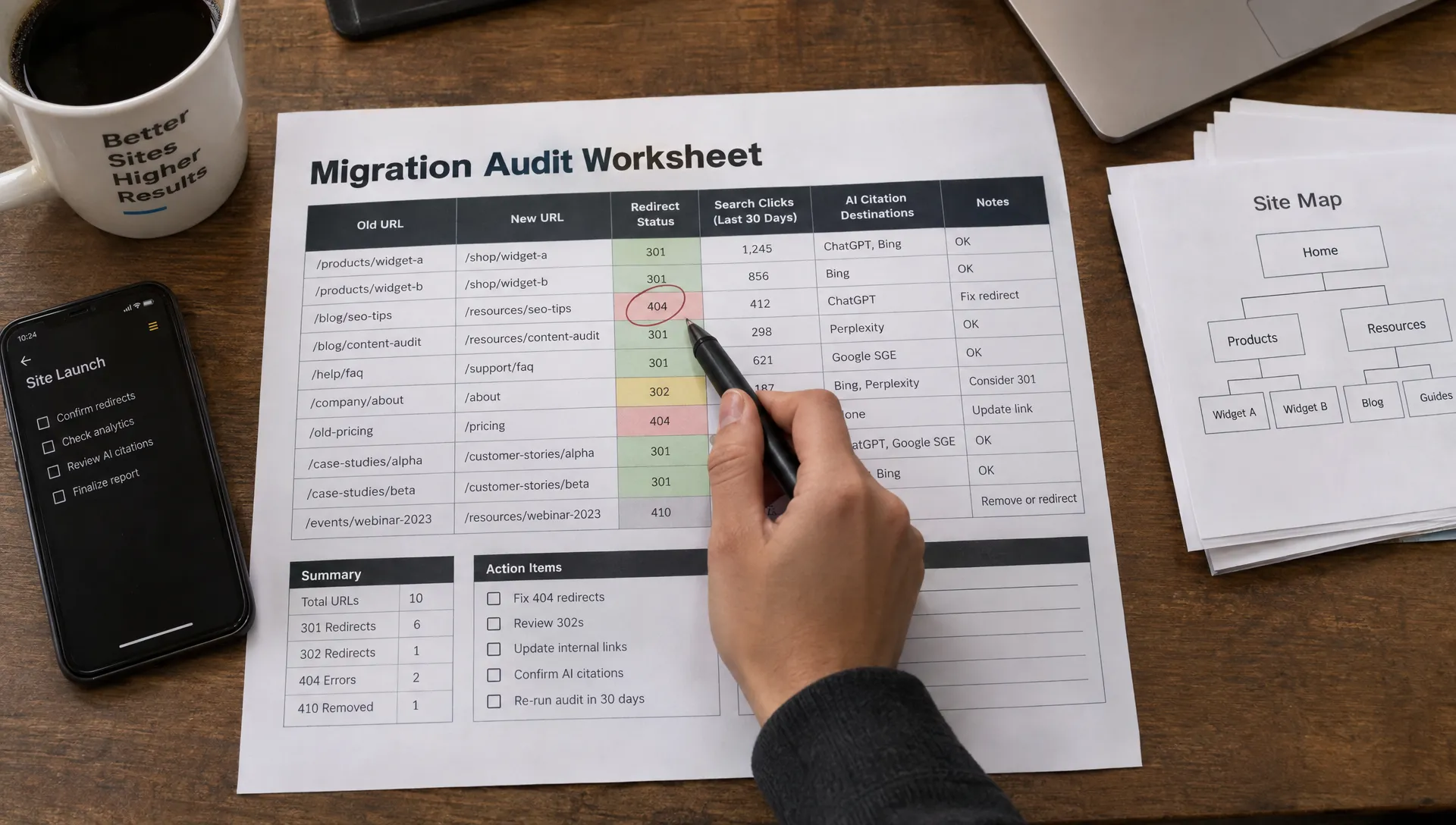
Build an old-to-new URL map with one row per meaningful destination. Include the previous URL, replacement URL, page purpose, baseline clicks and business priority. This becomes the reference for both technical testing and performance reporting.
Compare Matched Destinations, Not Just Domain Totals
Suppose the old domain previously received 10,000 weekly organic clicks. After migration, it receives 1,200 and the new domain receives 7,400. Combined clicks are 8,600, a 14% decline against that illustrative baseline, not a complete loss and not full recovery.
Inspect those totals through matched page groups. Homepage growth can conceal losses across hotel location pages, product categories or high-value service pages.
When you check SEO visibility, account for Search Console’s canonical attribution: performance can shift between properties as Google processes the move. Query exports also omit some low-volume queries for privacy, so exported query rows may not reconcile with headline totals.
Do not add two proprietary visibility scores or average their average positions. Use raw clicks and impressions where available, then compare rankings for the same queries under consistent tracking conditions.
Diagnose Technical Failures Along the Migration Path
Test the complete journey: old URL, redirect, new destination, rendered content and selected canonical. Checking only the new homepage misses failures that affect revenue-producing pages.
Preserve Page-Level Redirects
Each valuable old URL should permanently redirect to its closest equivalent, normally through a server-side 301 or 308 response. Aim for one hop rather than sending requests through several historical domains or URL structures.
Do not redirect every missing page to the homepage. That loses relevance for users and can be treated as a soft 404. When content has genuinely been removed without a suitable replacement, a proper 404 or 410 is more appropriate.
Use a full crawl for URL coverage and server logs to confirm that search crawlers can actually request old URLs and reach their replacements.
As you check SEO visibility, prioritize redirect failures affecting pages with previous clicks, strong external links or direct commercial value. Repairing an old booking-page redirect matters more than correcting an unused archive URL.
Google’s site-move guidance recommends keeping redirects for at least one year. Maintain the old domain’s registration, DNS and required hosting or redirect infrastructure so those redirects remain accessible.
Confirm Indexability and Canonical Selection
Inspect representative pages from every template and priority market. Look for staging restrictions carried into production, including robots.txt blocks, noindex directives and authentication requirements.
New pages intended for indexing should usually return 200 responses and identify the intended new URL as canonical. Canonical tags pointing back to the old domain can contradict the migration.
Compare the declared canonical with Google’s selected canonical through URL Inspection. A successful live test confirms current accessibility, but does not prove that Google has indexed the page or selected the intended canonical.
For eligible domain moves, submit Search Console’s Change of Address after implementing redirects and meeting its verification requirements. Publish a sitemap containing the intended new canonical URLs. Neither action replaces working redirects.
Remove Conflicting Discovery and Performance Signals
Update internal links, navigation, hreflang references, structured data URLs and important external profiles to use the new destinations directly. Internal linking should reinforce the new domain rather than route crawlers through redirects indefinitely.
Preserve meaningful content, titles and location or product relationships unless a deliberate change is necessary. Simultaneously changing the domain, site architecture and copy makes losses harder to diagnose.
Also check SEO visibility alongside page performance. Slower templates, inaccessible mobile navigation or a broken booking widget can reduce business results even when rankings hold. Compare Core Web Vitals, server errors and key customer journeys before and after launch, rather than treating a single lab performance score as the outcome.
Segment Losses Before Choosing a Fix
A domain-wide average rarely identifies the next action. Compare performance by country, device, search intent, page template and result type where reporting supports it.
For a hotel group, separate branded hotel searches from destination searches and individual property pages from editorial travel content. For an MSP, distinguish informational articles from location-specific managed IT service pages. For e-commerce, compare category and product performance separately.
A local healthcare example makes the distinction concrete. In a hypothetical migration for a practice such as West Malling Dental & Implant Centre, track searches for the practice name separately from “dentist in West Malling” and dental implant queries. Stable branded demand would not establish that prospective patients can still discover its services.
Use patterns to narrow the investigation. A decline limited to mobile can justify testing rendering and navigation. A location-only decline calls for checking local landing pages, business-profile links and location accuracy. Neither pattern proves causation without further evidence.
For demand changes that overlap the migration, use matched comparisons to separate seasonality from algorithm effects. This prevents a seasonal booking decline from being mislabeled as a redirect failure.
Verify That AI Answers Recognize the New Domain
You should also check SEO visibility beyond conventional result pages. ChatGPT, Google AI Overviews, Gemini, Perplexity, Claude and Copilot can name your business, cite an old URL or describe an outdated location even while Google’s organic results improve.
Generative Engine Optimization (GEO) focuses on how generative systems discover, understand and reference your business. Answer Engine Optimization (AEO) focuses on making information useful for direct answers. Both depend on clear content and technical accessibility, but neither provides control over what an engine chooses to say.
Reconcile the Business Entity Across Domains
A business entity is the recognizable organization, place or product behind the URLs. Preserve consistent names, addresses, service descriptions and relationships so the domain move does not introduce conflicting identity signals.
Update relevant Organization, LocalBusiness, Product or other supported schema to reference accurate new URLs. Check logo links, social-profile references and location details. If schema identifiers change, update related references consistently.
For franchises and multi-site brands, inspect individual locations rather than only the parent organization. A correctly described group does not guarantee that an assistant identifies the right branch or booking destination.
Repeat a Fixed Set of AI Discovery Tests
Choose prompts that reflect real buying decisions, then keep the engine, prompt wording, language, requested location and testing conditions consistent. Include branded facts, category recommendations and location-specific needs.
Run each prompt more than once, because generated answers vary. A small, repeated sample is more informative than treating a single response as a permanent ranking.
Record whether the business is mentioned, which domain is cited, whether the cited page resolves and whether essential facts are correct. Distinguish an old citation that redirects successfully from one that sends a customer to a dead page.
When you check SEO visibility across AI engines, define share of voice explicitly. One workable measure is your brand’s share of recorded brand mentions within a fixed prompt set. Keep that separate from citation frequency and factual accuracy; they answer different questions.
CapstonAI supports multi-engine visibility scans, prompt and mention mapping, citation tracking and competitor monitoring. For reporting definitions, use a measurement framework that separates AI exposure from rankings and business outcomes.
Fix Source Problems Before Adding More Files
Make important facts available in accessible page content, not only images or interactive components. Explain services clearly, maintain useful internal links and ensure relevant crawlers are not unintentionally blocked. Review crawler permissions individually rather than assuming every AI user agent serves the same purpose.
Structured data helps express supported facts, but it does not guarantee citations or enhanced search appearances. An llms.txt file can be an optional navigation aid, but it is not a universally adopted indexing instruction or a substitute for redirects and crawlability.
Google’s guidance on AI features and websites emphasizes established search fundamentals rather than special AI markup. Google also includes AI-feature traffic within Search Console’s overall Web performance reporting, so those totals do not provide a clean, standalone AI Overviews recovery report.
Prioritize Fixes by Customer Impact and Evidence
Turn findings into a migration issue log with an affected URL group, supporting evidence, owner and retest date. Keep technical defects separate from performance changes that still need investigation.
| Finding | First action | Evidence to collect afterward |
|---|---|---|
| Important old URLs return errors | Restore appropriate redirects | Successful destination responses and crawler requests |
New service pages retain noindex |
Remove unintended restrictions | Recrawl and indexing evidence |
| Canonicals reference the old domain | Correct canonical signals | Updated selected canonicals over time |
| Rankings hold but leads fall | Test analytics and conversion journeys | Successful tracked submissions or bookings |
| AI answers cite broken old URLs | Repair destinations and source consistency | Repeated citation and accuracy checks |
Check SEO visibility frequently during the initial rollout, but match each review to the speed of its evidence. Redirects and checkout failures can be tested immediately. Search indexing, rankings and AI citations require repeated observations rather than hourly conclusions.
A practical starting cadence is daily technical and conversion checks during the first week, followed by weekly matched performance reviews while the move stabilizes. Escalate immediately when high-value pages become inaccessible. Adjust the cadence for site size, crawl frequency and issue severity.
Verify Measurement Before Declaring a Traffic Loss
Confirm that analytics tags, consent behavior and conversion events work on the new domain. Test booking engines, payment handoffs and lead forms with real end-to-end journeys. Review cross-domain measurement where customers move between separate domains.
If Search Console clicks remain steady but measured organic sessions collapse, investigate instrumentation before concluding that discoverability disappeared. If sessions hold but bookings fall, investigate the customer journey. If both impressions and clicks fall within a migrated page group, inspect its technical signals, content changes and search demand.
A useful recovery statement is specific: “Priority service-page clicks are approaching the matched baseline, sampled redirects work and tracked inquiries are stable.” “The visibility score is green” is not enough.
Frequently Asked Questions
How long does visibility recovery take after a domain migration? There is no universal deadline. Processing depends on site size, crawl frequency, redirect quality and other changes made during the move. Judge progress through old-to-new URL replacement, matched search trends and business outcomes, not a promised recovery date.
Can a free tool confirm that the migration succeeded? Free tools can establish important facts, but no single report proves success. Use Search Console for search performance and indexing evidence, analytics for customer outcomes and crawler or server-response tests for URL behavior. Free audits and third-party tools may limit page coverage, query history or AI prompt sampling.
How often should I check SEO visibility after launch? Review critical access and conversion checks daily at first, with weekly comparisons for search performance. Continue until priority page groups show sustained stability. Keep recurring monitoring afterward to catch expired redirect infrastructure, broken templates or outdated AI citations.
Does an old-domain citation in an AI answer mean the move failed? Not necessarily. The answer may rely on an older source, while the cited URL still redirects correctly. Record whether customers reach the right destination and whether the answer’s facts are accurate. A broken citation or wrong booking destination deserves more urgent attention than an old but functional link.
Start With a Free AI Visibility Audit
Begin with a free AI visibility audit from CapstonAI to identify where your brand appears, where citations point and which discovery gaps deserve investigation.
Then combine those findings with your paired-domain Search Console report and redirect map. Assign the three highest-impact issues, fix them and repeat the same tests. That gives your team evidence of progress across search exposure, AI answers and the customer journeys the migration needs to preserve.