
AI crawler blocks can weaken AI search visibility without creating an obvious error for your customers. Your booking page loads in a browser, but a CDN security rule may challenge an automated request before it reaches your server. Checking origin logs alone can miss the failure entirely.
The reliable approach is to trace requests across three places: CDN request logs, security events and origin access logs. Then verify which crawler made the request, whether access matches your policy and what content the crawler actually received.
This guide focuses on finding accidental blocks, not opening your website to every bot. Search retrieval, model training and user-triggered fetching require separate decisions.
What crawler blocks look like in practice
A blocked request does not always return 403 Forbidden. Some systems return a challenge page with a successful HTTP status, while others throttle requests or terminate the connection.
| Observed result | Possible explanation | Evidence to check |
|---|---|---|
Edge returns 403, no matching origin request |
CDN or web application firewall denied access | Security action, rule ID and cache status |
Response returns 429 |
Rate limiting at the edge or origin | Rate-limit event, request volume and Retry-After header |
Response returns 200, but contains a browser challenge |
Successful delivery of a challenge, not the requested content | Response body and security event |
Edge returns 502, 503 or 504 |
Origin failure, upstream timeout or an edge-generated error | Origin status, connection errors and response timing |
Response returns 401 or redirects to login |
Authentication or access-control requirement | Redirect chain and application configuration |
| No crawler requests appear | No crawl occurred, logs are incomplete or requests were stopped elsewhere | Logging coverage, retention, hostname and upstream services |
Absence from your logs is not proof that a crawler was blocked. Likewise, a 200 response is not proof that it received useful content.
1. Identify the crawler and the access you intend to permit
Before changing a firewall rule, establish whether the request belongs to search discovery, training or a user-triggered fetch. Allowing one category does not require allowing the others.
Separate search crawlers from training crawlers
These user-agent names are useful starting points for log searches, not sufficient proof of identity:
| Ecosystem | Useful identifiers | Important distinction |
|---|---|---|
| OpenAI | OAI-SearchBot, GPTBot, ChatGPT-User |
Search crawling, training crawling and user-triggered fetching have different purposes |
| Anthropic | Claude-SearchBot, ClaudeBot, Claude-User |
Search, model-development crawling and user-directed access should be assessed separately |
| Perplexity | PerplexityBot, Perplexity-User |
Search crawling and user-initiated retrieval are distinct |
Googlebot |
Google Search crawling is relevant to eligibility for AI Overviews; Google-Extended is not a separate HTTP request user agent |
|
| Microsoft | bingbot |
Bing indexing is relevant to search-backed Microsoft experiences, but does not account for every Copilot retrieval path |
OpenAI documents these distinctions in its crawler documentation. Google's crawler overview explains crawler types and robots.txt product tokens.
Do not assume a single crawler name covers everything an assistant does. ChatGPT, Gemini, Claude, Perplexity and Copilot can use different retrieval paths, and a log entry does not reveal every downstream use of that content.
Write down the policy before troubleshooting it
A practical policy might permit search discovery on public product and location pages, prohibit training crawling and retain authentication on customer accounts. This prevents an engineer from “fixing” an intentional restriction.
Keep robots.txt policy separate from network enforcement. A compliant crawler may avoid a disallowed URL without generating a failed page request. Use the guide to robots.txt controls for AI bots for policy configuration, then use logs to investigate what happened at the infrastructure layer.
2. Collect evidence from the CDN and origin
Start with a seven-day window if your retention allows it. Extend the window when crawler activity is sparse, and document any sampling or missing periods.
Export request logs as well as security events. Security dashboards often show only selected events, while origin logs exclude requests served from cache or rejected upstream.
Capture fields that support correlation
Normalize vendor-specific names into a consistent investigation table:
| Field | Why it matters |
|---|---|
| Timestamp and time zone | Aligns events across systems; use UTC where possible |
| Request ID or trace ID | Connects an edge request to its origin request when propagated |
| Host, method and path | Identifies the affected website, route and request type |
| User agent | Finds candidate crawler traffic |
| Client IP | Supports identity verification and rate-limit analysis |
| Edge status and origin status | Helps distinguish an edge response from an upstream response |
| Security action and rule ID | Identifies the policy responsible for a block or challenge |
| Cache status | Explains why a successful request may never reach the origin |
| Response bytes, content type and timing | Helps detect challenge pages, unexpected responses and timeouts |
Do not blindly trust an incoming X-Forwarded-For header. Use the client-IP field established by your trusted proxy configuration, and ensure the origin accepts forwarded identity information only from trusted infrastructure.
Avoid exporting cookies, authorization headers or unnecessary query parameters. Request logs can contain personal information and secrets, so restrict access and retain only what the investigation requires.
Confirm that the logs are comparable
Check whether CDN and origin timestamps use different time zones. Determine whether the CDN forwards a request identifier and whether your server records it.
If no shared identifier exists, correlate by timestamp, hostname, path and method, allowing for retries. Treat that match as less certain, especially on busy routes. The origin may record the CDN's IP rather than the crawler's IP, so those addresses will not necessarily match.
3. Filter crawler candidates, then verify identity
Use user-agent filtering to locate candidates quickly. Do not use it as an authorization mechanism: anyone can send a request claiming to be OAI-SearchBot or Googlebot.
The following SQL assumes a normalized table named requests, with edge_status stored as an integer. Adapt field names and syntax to your logging platform:
SELECT
  user_agent,
  edge_status,
  security_action,
  rule_id,
  COUNT(*) AS observed_requests
FROM requests
WHERE
  LOWER(user_agent) LIKE '%oai-searchbot%'
  OR LOWER(user_agent) LIKE '%gptbot%'
  OR LOWER(user_agent) LIKE '%chatgpt-user%'
  OR LOWER(user_agent) LIKE '%claude-searchbot%'
  OR LOWER(user_agent) LIKE '%claudebot%'
  OR LOWER(user_agent) LIKE '%claude-user%'
  OR LOWER(user_agent) LIKE '%perplexitybot%'
  OR LOWER(user_agent) LIKE '%perplexity-user%'
  OR LOWER(user_agent) LIKE '%googlebot%'
  OR LOWER(user_agent) LIKE '%bingbot%'
GROUP BY
  user_agent,
  edge_status,
  security_action,
  rule_id
ORDER BY observed_requests DESC;
Apply your investigation's date and hostname filters as well. This query reveals combinations worth investigating, such as one security rule accounting for many candidate crawler denials. It does not establish that every matching request is genuine.
Validate candidates using operator-supported methods
Where the operator publishes crawler IP ranges, compare source addresses against its current official ranges. Where it specifies DNS verification, follow that procedure rather than accepting a plausible-looking hostname.
For Googlebot, Google's verification instructions describe reverse and forward DNS checks and published IP lists. A reverse lookup alone is insufficient.
A CDN's verified-bot classification can provide supporting evidence, but check which bot category it identifies. A general “verified bot” label does not necessarily identify the specific crawler you intended to permit.
Keep claimed crawler traffic and verified crawler traffic separate in your report. Otherwise, spoofed traffic can distort your diagnosis and lead to unsafe exceptions.
4. Trace a failed request to the blocking layer
Choose one verified request to a commercially important URL. Investigate that request completely before making a site-wide change.
A useful test set includes a homepage, a category page, a detailed product or service page and a location page. For a specialty catalog such as Ant Farms Calgary's ant farm kits and live colonies, a hypothetical investigation would sample kit pages, colony pages and care guides separately. Homepage access alone cannot establish whether those different templates are retrievable.
For hotels, prioritize room and property pages. For an MSP, include service and service-area pages. The business risk depends on which information is inaccessible, not simply how many requests failed.
Interpret the evidence together
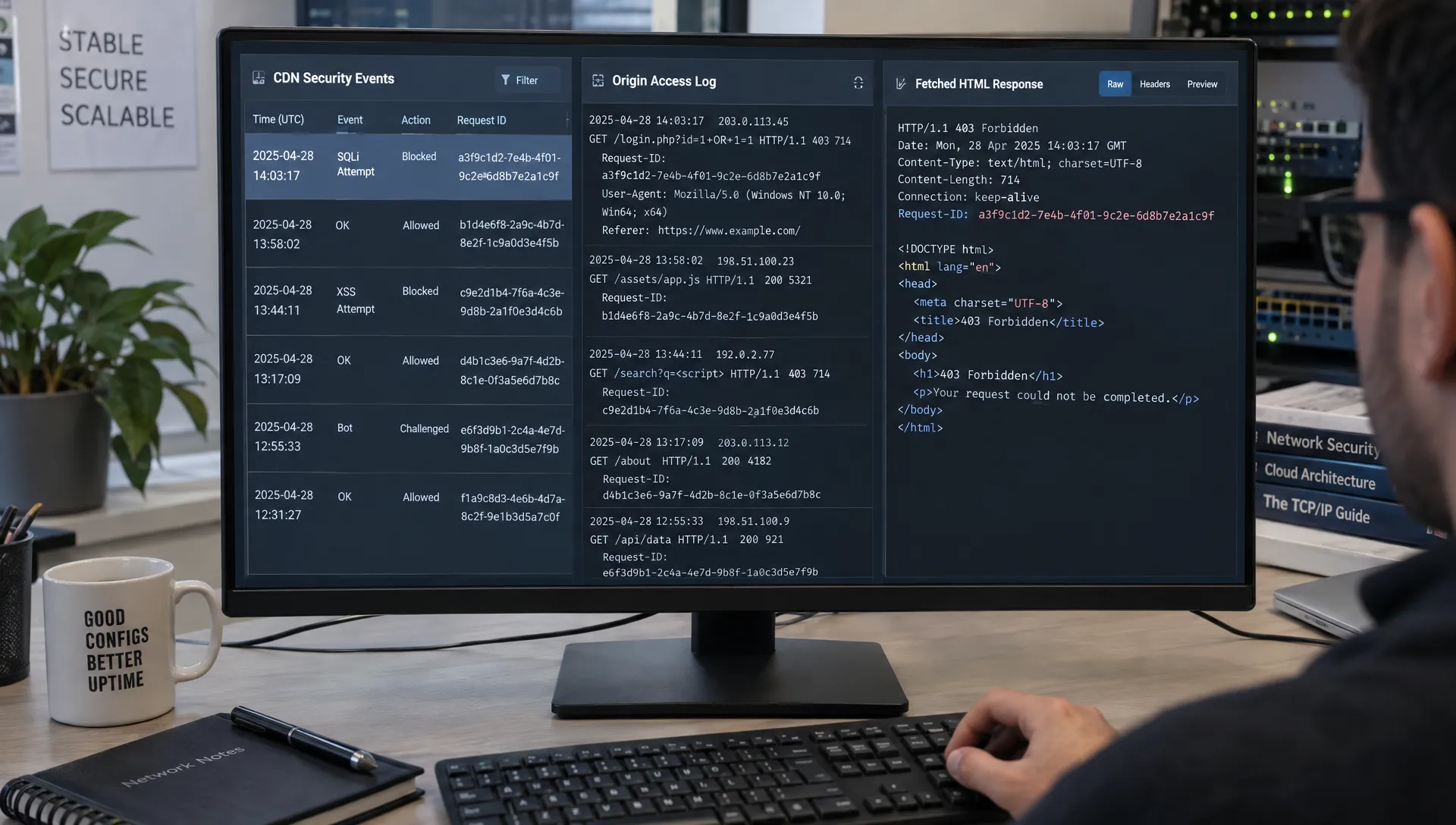
Suppose an illustrative CDN event shows request r-1042, status 403, action block and rule automation-17. No matching origin request appears.
That is strong evidence of an edge rejection if the edge event confirms the block and origin logging is complete. The missing origin entry alone would not establish this, because cache hits also bypass the origin.
If the edge forwards the request and the origin returns 403, inspect the server, application firewall, hosting security plugin and authentication rules. Changing a CDN rule will not fix an application-level denial.
For 429 responses, locate the actual rate limiter. A shared IP-based limit may affect legitimate crawling, but verify request volume before increasing it. For 5xx responses, inspect upstream failures and timeouts rather than automatically classifying them as bot blocks.
Check successful responses for hidden failures
A 200 response may contain a cookie-consent interstitial, JavaScript challenge or generic error page. Compare the response with the expected product name, service description or location information.
Response size is a useful clue, not proof. A small response can be legitimate, and a large challenge page can still contain no useful business content.
5. Reproduce the response without mistaking it for crawler proof
A controlled HTTP request can help isolate user-agent rules, redirects and challenge responses. Run tests only against infrastructure you own or are authorized to assess.
For example:
curl --compressed -sS -L --max-redirs 5 \
  -A 'OAI-SearchBot' \
  -D headers.txt \
  -o body.html \
  -w 'Final status: %{http_code}\nURL: %{url_effective}\n' \
  'https://www.example.com/products/example-kit/'
This saves response headers and the final body while following up to five redirects. Inspect headers.txt for status changes, rate-limit information and unexpected redirects. Inspect body.html for the expected page content and challenge messages.
Changing the user agent does not make curl an authentic crawler. Your request comes from a different IP and uses a different network and TLS fingerprint. A successful test cannot prove that the real crawler will succeed, while a failed test may reflect controls aimed at your test environment.
Compare one variable at a time
Repeat the same URL with a browser user agent and the crawler identifier. Keep the source network and other request settings constant. This can reveal a user-agent-specific rule, though it still does not reproduce the operator's full request behavior.
Check each redirect destination as well. The initial page may be accessible while a canonical hostname, regional route or final destination is blocked.
If a request fails before an HTTP response exists, inspect DNS, TLS and connection errors. WAF event searches cannot explain every failed connection, and those failures may require network or load-balancer logs.
6. Fix the narrowest rule and verify real traffic
Match remediation to the evidence. Avoid disabling bot protection across the website because one legitimate crawler request failed.
| Confirmed problem | Scoped remediation |
|---|---|
| Search crawler receives a browser challenge | Exempt the verified crawler category from that challenge on approved public routes |
| An explicit WAF rule blocks legitimate requests | Adjust the specific rule or add a narrowly defined exception |
| Legitimate crawling triggers rate limits | Tune the relevant limit using observed volume and available server capacity |
| Application or hosting plugin rejects the request | Correct the originating rule rather than adding an unrelated CDN exception |
| Protected content returns an authentication requirement | Preserve protection; provide a separate public summary if appropriate |
| Origin timeouts interrupt retrieval | Investigate caching, backend latency and capacity |
Never build an allowlist solely around a user-agent string. Use operator-supported identity verification or an appropriate verified-bot control, and keep login, account, checkout and administrative routes protected.
An exception to one challenge rule should not automatically bypass every security control. Preserve applicable protections against malicious requests.
Record a before-and-after test
Save the rule identifier, affected routes, change time and rollback procedure. Then observe new verified crawler requests to the same route types.
Track the share of observed verified requests receiving explicit blocks, challenges, 429 responses and 5xx responses separately. Report the observation window and sample size. If you saw five requests, do not present the result as a stable site-wide rate.
A practical handoff should contain:
- The affected hostname, route and business purpose
- A timestamp, request identifier and verified crawler identity
- The blocking layer, action and responsible rule
- The scoped change, rollback plan and post-change evidence
This gives an agency, hosting provider or internal infrastructure team enough detail to act without guessing.
A successful fetch is only the first layer of AI search visibility
Crawler access is a technical SEO foundation, not a guarantee of brand mentions or citations. Generative Engine Optimization (GEO) and Answer Engine Optimization (AEO) build on that foundation by making public information easier to retrieve, understand and use in answers.
Once access works, check whether important entities, such as your brand, properties, products and service areas, are clearly identified. Use internal linking to connect those pages, and ensure structured data matches visible content. Schema can clarify meaning, but it cannot override a firewall denial or guarantee a citation.
Check page performance from the crawler's perspective: slow origin responses and intermittent timeouts can make retrieval unreliable. If essential details appear only after JavaScript executes, investigate whether the fetched response contains them. This guide to AI access on JavaScript product pages covers that separate failure mode.
Treat llms.txt as an optional, proposed discovery aid, not a universally supported requirement or a substitute for crawlability.
Finally, measure answer outcomes separately. A permitted fetch is infrastructure evidence. Brand mentions, citations and share of voice across a defined prompt set are AI visibility evidence. Neither measure substitutes for the other, and gains in access do not automatically produce bookings or leads.
Frequently asked questions
Does blocking GPTBot remove my website from ChatGPT search? GPTBot and OAI-SearchBot have different documented purposes. Review your intended training and search policies separately, then verify the relevant requests rather than treating all OpenAI traffic as one category.
Why does my CDN show a request that my server never received? The CDN may have served cached content, blocked or challenged the request, or failed before contacting the origin. Check security actions, cache status and logging completeness before drawing a conclusion.
Can I allow an AI crawler by its user agent? A user-agent-only exception is easy to impersonate. Use the operator's supported verification method or a suitable verified-bot control, scoped to approved public content.
How soon will fixing a block produce AI citations? There is no guaranteed timeline or outcome. Confirm successful real crawler requests first, then monitor a consistent prompt set for changes in mentions and citations. Retrieval eligibility is not selection.
Start with a free AI visibility audit
Start with a free AI visibility audit from CapstonAI to establish where your brand appears across AI answers and where gaps need investigation. Pair those findings with CDN and server-log evidence to distinguish an access problem from a content or citation gap.
CapstonAI tracks mentions, citations and prompt coverage across multiple engines. Use that measurement alongside your infrastructure team's verified request data: fix the failing access path, confirm retrieval and then measure whether answer visibility changes.